
Скачать AT Media Player Max
to play almost all media files.
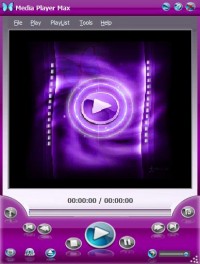
Media Player Max is an easy-to-use program with amazing interface to play almost all media files with an easy-to-use playlist, The player can also play DVD-Video discs and Video-CD discs. The program features are: 1) Supported Input Audio Formats: wav , wma , mka , m4a , mp3 , mp4 , ogg , aac , 3g2. 2) Supported Input Video Formats: .wmv , asf , avi , mpg , mp2 , mpe , mpeg , mp4 , m4v , ogm , mov , hdmov, 3gp , 3gpp , 3g2 , flv. 3) Supports Video DVDs . 4) Easy-to-use design. 5) Smart playlist with thumnails view. 6) Variety range of codecs. The file menu contains the basic menu items that enable you to open your media file you have many choices to open media file as follow: 1) Open Media File: To open supported media files. Like (wmv, asf, avi, flv, ogm, 3gp, etc…). 2) Open DVD: Let you choose the DVD-Drive to play the inserted video DVD from it. 3) Recently played files: Open from the recent files that you played. The play Menu supports full playback control it contains many menu items as follows: 1. Play/Pause: Playing and pausing the media and you can do that by using the short key (Ctrl+P). 2. Stop: Stopping the video play and you can use (Ctrl+S) short key. 3. Play Mode: Change the playback mode between three states Normal, Continuous and Shuffle. 4. Repeat Mode: No Repeat: After the end of playlist or the end of the file the program stops playing, Single Repeat: the program repeats the current file only and Repeat All: Repeats all files. 5. Full Screen: Toggle full screen mode and you can use (Ctrl+F) short key. 6. Increase Speed:Doubles the playback speed and make the playing faster you can use (Ctrl+Up Arrow) shortkey. 7. Decrease Speed:Decreses the playback speed and make the playing slower, you can use (Ctrl+Down Arrow) shortkey. 8. Reset Speed: Normal playback speed. (Ctrl+R) short key. 9. After file Playing finished: Choose what you want after playback finishes. Do Nothing: after playing nothing to do. Exit Media player Max: Exit the program
Скачать AT Media Player Max бесплатно на странице загрузки.
AT Media Player Max 7.3.3.3000
Основная информация о программе
Разработчик
Лицензия
Версия
Дата релиза
Размер файла
Операционная система
Семейство
Версия ОС
Win98
WinME
WinNT 3.x
WinNT 4.x
Windows2000
WinXP
Windows Vista Starter
Windows Vista Home Basic
Windows Vista Home Premium
Windows Vista Business
Windows Vista Enterprise
Windows Vista Ultimate
Windows Vista Home Basic x64
Windows Vista Home Premiu
Требования
Популярность у пользователей
Рейтинг
Голосов
Статистика просмотров
За сегодня
За неделю
За все время
Статистика загрузок
За сегодня
За неделю
За все время
Дополнительная информация
Дата изменения
Ключевые слова
Скачать AT Media Player Max 7.3.3.3000
Media
Player
Max
audio
video
formats
media
DVD-Video
discs
Video-CD
Video DVDs
wav
wma
mka
m4a
mp3
mp4
ogg
aac
3g2
wmv
asf
avi
mpg
mp2
mpe
mpeg
m4v
ogm
mov
hdmov
3gp
3gpp
3g2
flv
DVD-Drive
DVD
codecs
Smart
Популярные программы рубрики


