
Скачать CSV to vCard for Mac Conversion
CSV to vCard for Mac Conversion
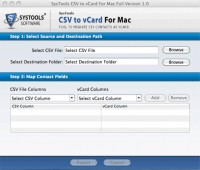
CSV to vCard for Mac Conversion via CSV to vCard for Mac converter is efficient now. Within few simple and easy steps you can convert CSV to vCard format. Following are the step by step process to convert CSV to vCard for Mac like-
(1) Browse CSV file
(2) Map your contacts column with vCard map
(3) Map all columns
(4) Remove unwanted mapping
(5) Click on export.
With minimal of without technical knowledge, you can run the program easily to convert CSV to vCard for Mac format. This is the easy and simple solution for you when you need CSV to vCard for Mac Conversion.
When you convert CSV to vCard for Mac after that you can use your contacts in various email client application like for Mac like Outlook Mac, Lotus Notes Mac and other Mac based devices as well.
Download free demo version of software to check out how to convert CSV to vCard for Mac format. With the help of demo version you can convert first fifteen contacts thus, order now to purchase key of full version of CSV to vCard for Mac, which helps in converting numerous contacts only in $39 for personal license key and business key only in $99 for business license key. If user faces any kind of problems then they can contact our technical support team.
Скачать CSV to vCard for Mac Conversion бесплатно на странице загрузки.
CSV to vCard for Mac Conversion 1.0
Основная информация о программе
Разработчик
Рубрика
Лицензия
Версия
Дата релиза
Размер файла
Операционная система
Семейство
Версия ОС
Mac Other
Требования
Популярность у пользователей
Рейтинг
Голосов
Статистика просмотров
За сегодня
За неделю
За все время
Статистика загрузок
За сегодня
За неделю
За все время
Дополнительная информация
Дата изменения
Ключевые слова
Скачать CSV to vCard for Mac Conversion 1.0
CSV to vCard for Mac
CSV to vCard for Mac conversion
Популярные программы рубрики


