
Скачать File Password Protection Software
Files and Folder Password Protection Software
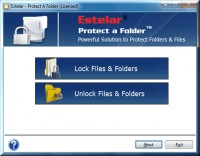
Estelar Lock a Folder Tool is a powerful file and folder password protection software that
offers advanced security solution to take control on your private files, folders, and other
Windows resources. This file and folder password protection software can be used to
protect your data and stops other unwanted users accessing your data. Using the folder
security system you can also protect your data on other removal storage devices such
as pen drive external portable hard drive. Once your files or folder are protected using
Estelar Lock A Folder software then no one can access such folder and files with knowing
the correct password.
How to Use this advanced File and folder Password Protection Software?
Step One: Run Lock a Folder - After installing the software go to 'Start menu > Programs
> Estelar Lock a Folder from there choose Lock Files & Folders
Step Two: Browse a Folder or File - Click on the "Add Folder or File" icon to import the
folder/ file which you want to lock.
Step Three: Press Lock Button - Enter the password and click the 'Lock' button to lock a
folder or file.
Now you can download the free files and folder password protection program for your
evaluation purposes.
Скачать File Password Protection Software бесплатно на странице загрузки.
File Password Protection Software 1.5
Основная информация о программе
Разработчик
Рубрика
Лицензия
Версия
Дата релиза
Размер файла
Операционная система
Семейство
Версия ОС
Win7 x32
Win7 x64
Win98
WinVista
WinVista x64
WinXP
Требования
Популярность у пользователей
Рейтинг
Голосов
Статистика просмотров
За сегодня
За неделю
За все время
Статистика загрузок
За сегодня
За неделю
За все время
Дополнительная информация
Дата изменения
Ключевые слова
Скачать File Password Protection Software 1.5
File Password Protection Software
folder security system
download folder security system
protect folder
protect a folder
protect a file
Популярные программы рубрики


