
Скачать JComponentPack Professional Edition
JComponentPack Professional Edition
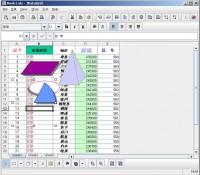
JDataGrid Core Component Features:
JDataGrid Core Component Features
Print and Print Preview
Printing in JDataGrid is easy, JDataGrid allows you control the print area, print preview the page, setup the page margin, page header text and icon, page footer text and icon.
Find and Replace
JDataGrid support finding and replacing the text in the spreadsheet.
Spell Check
JDataGrid provide the spell checking functionality, this feature enable you check the text in the spreadsheet.
Row Header
JDataGrid provides a row header to indicate the row number of the database table.
Cell Attributes(Font, Background, Underline, Cell Border, Format)
JDataGrid allows you change the cell attribtes, change the cell background, font color, cell border, it also allows you change the cell format for different data type, for date cells, you can change the date format, for number cells, you can change the number format.
JDataGrid Spreadsheet Component Features
Freeze Pane
The freeze pane feature in JDataGrid allows you to “freeze” certain areas or panes of
the spreadsheet so that they remain visible at all times when scrolling to the right or down.
Work Sheet
A worksheet is a single page or sheet in JDataGrid. By default, there are three worksheets per file. Switching between worksheets is done by clicking on the sheet tab at the bottom of the screen.
Merge and Split Cell
JDataGrid can merge and split the cell area, it also provide a CellSpanModel, this model can work with a Plain TableModel to provide this functionality.
Undo and Redo
JDataGrid support the feature undo and redo the action, this functionality is implemented by the Swing undo package.
Column and Cell Sorting
JDataGrid provide two different ways to sort the data, the column sorting enable sort the data in the full column, the cell sorting enable sort the data in the specified cell area.
More Info: http://visualbasic-6.com/jcomponentpack-professional-edition.html
Скачать JComponentPack Professional Edition бесплатно на странице загрузки.
JComponentPack Professional Edition 3.0.0.0
Основная информация о программе
Разработчик
Лицензия
Версия
Дата релиза
Размер файла
Операционная система
Семейство
Версия ОС
iPhone
iPod
iTouch
Java
Linux
Linux Console
Linux Gnome
Linux GPL
Linux Open Source
Mac OS X
Mac Other
MS-DOS
Palm
Pocket PC
Unix
Win2000
Win7 x32
Win7 x64
Win98
WinMobile
WinOther
WinServer
WinVista
WinVista x64
WinXP
Other
Требования
Популярность у пользователей
Рейтинг
Голосов
Статистика просмотров
За сегодня
За неделю
За все время
Статистика загрузок
За сегодня
За неделю
За все время
Дополнительная информация
Дата изменения
Ключевые слова
Скачать JComponentPack Professional Edition 3.0.0.0
BoxLayout2
calendar
CardLayout2
CellLayout
component in java
components in java
GridLayout2
help with java
includes JWizardPane
Java
java applets
java classes
java coding
java component
Java Date Picker
java development
Java Directory
Популярные программы рубрики


