
Скачать PDF Copy Paste
Crop text and graphics out of a PDF document
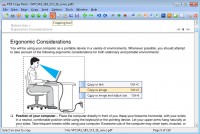
PDF files are great for exchanging formatted files across platforms and between folks who don't use the same software. But sometimes we need to be able to take images or text out of a PDF file and use it in web pages, word processing documents, PowerPoint presentations, or in desktop publishing software.
PDF Copy Paste software allows you crop out the text, picture, image, photo, chart, and other graphical elements from PDF files. Simply use your cursor to draw out a rectangle around the area you want to crop, press Ctrl-C, and the text in your selected area will be copied to Windows clipboard; press Ctrl-X, and the selected area will be copied as an image to Windows clipboard. You can save your selection to a JPG, BMP, GIF, PNG, TIFF, EMF, WMF, or EPS file if you press Ctrl-S.
The software brings a new cropping method to PDF professionals, Quick Save, which enables you to bypass the annoying Save-As-File dialog and save your PDF pages or cropped portion as image files in your preferred output folder. Draw a rectangle area around your desired content, click Ctrl-S, and the content will be saved as an image file in your output folder. You might as well extract text in your selected area if you specify the output format to TXT.
PDF Copy Paste offers you additional features such as to send your desired portion of a PDF file to email as an attachment with just one click. Dropping your desired PDF page as a full-page image or a portion of the page as a picture to Microsoft Word, Excel, PowerPoint, Visio, Publisher, Photoshop, Illustrator, and CorelDRAW becomes easy with just a few clicks.
You can adjust the DPI or dimension of your cropped portion or your whole PDF page before copying to clipboard or saving to file with the help of the Preview window. Rotation gives you better decision on how your selection or your PDF page will look like.
Included with the software are other useful features such as to convert PDF files to other text or graphics formats.
Скачать PDF Copy Paste бесплатно на странице загрузки.
PDF Copy Paste 2.0
Основная информация о программе
Разработчик
Лицензия
Версия
Дата релиза
Размер файла
Операционная система
Семейство
Версия ОС
Win7 x32
Win7 x64
WinServer
WinVista
WinVista x64
WinXP
Win8 x32
Win8 x64
Windows 7
Windows 8
Windows 10
Windows 11
Требования
Популярность у пользователей
Рейтинг
Голосов
Статистика просмотров
За сегодня
За неделю
За все время
Статистика загрузок
За сегодня
За неделю
За все время
Дополнительная информация
Дата изменения
Ключевые слова
Скачать PDF Copy Paste 2.0
crop
text
graphics
cut
out
portion
copy
paste
cropping
picture
image
photo
chart
graphical
element
selected
area
windows
clipboard
save
selection
word
excel
powerpoint
visio
publisher
adobe
photoshop
illustrator
coreldraw
JPG
BMP
GIF
PNG
TIFF
Популярные программы рубрики


