
Скачать VICalendar
Simply calendar for your Windows CE device
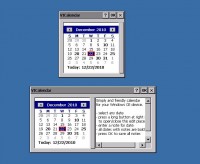
- select any date
- press a long vertical button at right side to open / close an edit window
- enter a note for selected date
- all dates with note will be shown bold
- press OK to save all notes to archive file
- next time when you start VICalendar all notes will be loaded from archive file
Tipps:
- click at month's name for quik change a month
- click at year's namber for quik change an year
- to use VICalendar simply copy the file VICalendar.exe to any place at your Windows CE device and start VICalendar.exe
- archive file for your notes VICalendar.exe.bin will be created automatically near the file VICalendar.exe
- VICalendar is made for use with ARM4 processor
- press X button (or Esc) to close VICalendar without saving the changes
- use Ctrl + Home, Ctrl + End, PageUp, PageDown for moving inside edit window
- to delete a note delete all text inside date
- to delete all notes delete the archive file VICalendar.exe.bin
Скачать VICalendar бесплатно на странице загрузки.
VICalendar 1.0
Основная информация о программе
Разработчик
Лицензия
Версия
Дата релиза
Размер файла
Операционная система
Семейство
Версия ОС
Требования
Популярность у пользователей
Рейтинг
Голосов
Статистика просмотров
За сегодня
За неделю
За все время
Статистика загрузок
За сегодня
За неделю
За все время
Дополнительная информация
Дата изменения
Ключевые слова
Скачать VICalendar 1.0
calendar
notes
Windows CE
ARM4
Популярные программы рубрики


