
Скачать BestSync
Synchronize file with FTP/Cloud/WebDAV etc
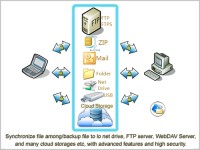
BestSync is a professional utility for following solutions
1. Synchronize files by network/USB drive.
2. Synchronize files by FTP server, support FTP/FTPS/SFTP.
3. Synchronize files with WebDAV collection.
4. Synchronize files with Amazon S3, Windows Azure, Google Storage and Rackspace Cloud Files.
5. Synchronize files with Microfoft OneDrive (Business), Google Drive and DropBox.
6. Synchronize a folder with a ZIP file, support AES cryptographic algorithm.
7. Synchronize Outlook(mail, contact).
8. Backup your critical files automatically to above local/remote/cloud storages.
BestSync has an easy to use interface and provides following advanced features:
1. Preview to confirm the hit files, and modify the action before starting synchronization.
2. Powerful file filtering and excluding function to synchronize necessary files only.
3. Resolves conflict intelligently and automatically. Can detect file copying, deleting and moving.
4. Detects time zone, resolving conflicts caused by Daylight Saving Time change when synchronize with FTP server.
5. Recognizes a removable drive, even if it is mounted as a different drive letter.
6. Flexible schedule to sync or backup file automatically.
7. Download huge file in segments by multiple session simultaneously.
8. Secure the files by compressing and encrypting the content and the file name.
9. Support renaming file while synchronizing file.
10. Prevents file from being corrupted at any occasion.
11. Run tasks as Windows Service, no user is needed to log on OS system.
12. Backup overwritten files/deleted files before synchronization to folders or ZIP archive, and restore them when needed.
13. Real-time synchronization to copy files immediately after change.
14. Can copy opened/locked file, be capable of backup database etc.
15. Resumes transferring file from last breakpoint to ensure large file be copied in defined time in unstable network.
16. Informs the synchronization result by email.
Скачать BestSync бесплатно на странице загрузки.
BestSync 17.0.0.5
Основная информация о программе
Разработчик
Рубрика
Лицензия
Версия
Дата релиза
Размер файла
Операционная система
Семейство
Версия ОС
Win10
Win8
Win7
WinServer
WinVista
WinVista x64
WinXP
Требования
Популярность у пользователей
Рейтинг
Голосов
Статистика просмотров
За сегодня
За неделю
За все время
Статистика загрузок
За сегодня
За неделю
За все время
Дополнительная информация
Дата изменения
Ключевые слова
Скачать BestSync 17.0.0.5
FTP Synchronization
Cloud Storage Synchronization
WebDAV Synchronization
AmazonS3 Synchronization
File Synchronization
Automatic File Backup
Популярные программы рубрики


