
Скачать Favorite to OneNote
Bookmark web page hyperlink to OneNote
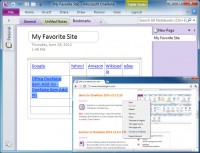
Bookmark web page hyperlink to OneNote 2013, 2010, 2007 from Browsers (IE, Chrome, Firefox, Opera).
These add-ins extend browsers bookmarks bar. We can collect and organize a lot of the links with OneNote now.ccess row.
How to use Favorite to OneNote
1. Bookmark a web page hyperlink to OneNote.
In ie or chrome or firefox, like "Bookmark" button to bookmark a web page hyperlink.
Right click on the web page, and in the popup context menu, click on "Favorite to OneNote",
this will create a hyperlink with the web page title in current OneNote page.
2. Bookmark a link's hyperlink to OneNote.
In ie or chrome or firefox, right click on the a link text, and in the popup context menu, click on "Favorite to OneNote",
this will create a hyperlink with the link text in current OneNote page.
We can use OneNote tables to organize a lot of links, that will easy to classification, will be more easy to read.
Скачать Favorite to OneNote бесплатно на странице загрузки.
Favorite to OneNote 3.0.0.10
Основная информация о программе
Разработчик
Рубрика
Лицензия
Версия
Дата релиза
Размер файла
Операционная система
Семейство
Версия ОС
WinVista
WinVista x64
Win7 x32
Win7 x64
WinServer
Требования
Популярность у пользователей
Рейтинг
Голосов
Статистика просмотров
За сегодня
За неделю
За все время
Статистика загрузок
За сегодня
За неделю
За все время
Дополнительная информация
Дата изменения
Ключевые слова
Скачать Favorite to OneNote 3.0.0.10
Favorite
OneNote 2007
OneNote 2010
OneNote 2013
Популярные программы рубрики


