
Скачать How to Convert Outlook Contacts
How to convert Outlook Contacts to vCard
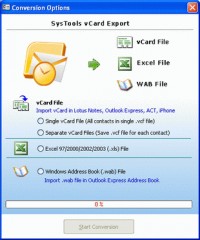
One solution that is a perfect solution to explain how to convert Outlook contacts in different file format. SysTools vCard Export is one simple solution to convert Outlook contacts in different format and export Outlook contacts without any limitation as well. SysTools vCard Export software is used to Export Outlook Contacts in VCF, WAB and MS Excel format. Software provides complete facility to Export Outlook Contacts information like name, address information, phone numbers etc to some other software in just a simple click. Software helps in Outlook Contacts to vCard conversion which is useful to use these contacts to any version of Windows. Software converts Outlook contacts to vCard, WAB & MS Excel in just a few clicks. After installation of the product, you just pursue the following step to export Outlook contacts to vCard.
1. In SysTools vCard Export, Select one of the following
1.1 Default Outlook Contacts
1.2 Select Other Outlook File
2. Click on "Scan Outlook Contacts" Button
3. You have to browse your PST file and click on "Scan Outlook Contacts" button if you choose another option
4. After scanning, click on "Save Contacts" Button
5. There is following option available
5.1 Single vCard File (All contacts in single VCF file)
5.2 Separate vCard file for each contacts
5.3 Excel file
5.4 Windows Address Book (.wab) file
6. Select one of the above mentioned option and click on "Start conversion" Button
7. Browse and give the location where you want to save your converted file.
The above information will help to know "How to convert Outlook Contacts". For free Outlook Contacts conversion, you can try demo version of SysTools vCard Export. Download demo version from SysTools site. Demo version converts 15 contacts of Outlook at a time. To get complete Outlook contacts at a time, you have to purchase licensed version of SysTools vCard Export at $49.
Скачать How to Convert Outlook Contacts бесплатно на странице загрузки.
How to Convert Outlook Contacts 4.0
Основная информация о программе
Разработчик
Рубрика
Лицензия
Версия
Дата релиза
Размер файла
Операционная система
Семейство
Версия ОС
WinNT 3.x
WinNT 4.x
Windows2000
WinXP
Windows2003
Windows Vista
Windows Vista Home Basic
Windows Vista Home Premium
Windows Vista Business & Windows7
Требования
Популярность у пользователей
Рейтинг
Голосов
Статистика просмотров
За сегодня
За неделю
За все время
Статистика загрузок
За сегодня
За неделю
За все время
Дополнительная информация
Дата изменения
Ключевые слова
Скачать How to Convert Outlook Contacts 4.0
how to convert outlook contacts
free outlook contacts conversion
convert vcard to excel
export outlook contacts
Популярные программы рубрики


