
Скачать X-Green Template ApPHP BusinessDirectory
Templates for ApPHP Business Directory script
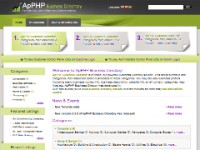
Ready to use HTML/CSS templates for ApPHP Business Directory script.
This is a fully featured template, ready to use for ApPHP Business Directory.
The installation of this template is very easy and simple process.
Step 1. Uncompressing downloaded file.
Uncompress the ApPHP Business Directory Template archive. The archive will create a directory called "PHPBD_TPL_xxx".
Step 2. Uploading files.
Upload content of this folder (all files and sub-directories it includes) to the templates/ directory of your Business Directory script using FTP.
Pay attention to DON'T use the capital letters in the name of the folder (for Linux users).
Step 3. Selecting a template.
Now you can select this template for your site. To do this, log into Administrator Panel of your site and go to General -> Site Settings, then select Templates and Styles tab.
On this page choose new option from the dropdown list of templates (for example "x-green"). Save your selection by clicking on 'Change' button.
Version: 1.0.1
Layout: 2 Column Fixed
Direction: Left-to-Right/Right-to-Left
Menus: Left, Top, Bottom
Скачать X-Green Template ApPHP BusinessDirectory бесплатно на странице загрузки.
X-Green Template ApPHP BusinessDirectory 1.0.1
Основная информация о программе
Разработчик
Рубрика
Лицензия
Версия
Дата релиза
Размер файла
Операционная система
Семейство
Версия ОС
Win7 x32
Win7 x64
WinOther
Windows2000
Windows2003
WinServer
WinMobile
Windows Tablet PC Edition 2005
Windows Phone 8
Windows RT
Требования
Популярность у пользователей
Рейтинг
Голосов
Статистика просмотров
За сегодня
За неделю
За все время
Статистика загрузок
За сегодня
За неделю
За все время
Дополнительная информация
Дата изменения
Ключевые слова
Скачать X-Green Template ApPHP BusinessDirectory 1.0.1
html template for business directory
classifieds template
directory listing template
Популярные программы рубрики


