
Скачать Classic Menu for Word 2007
Show Classic Menus Again in Word 2007
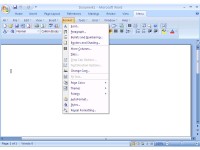
Bring back the classic menus and toolbars of Word 2003 to Microsoft Word 2007. You can use Word 2007 immediately without any training or tutorials if you used Word 2003 before. The software allows you to work with Word 2007 as if it were Word 2003.
All the new features in Microsoft Word 2007 have been added into the Main Menu, Standard Toolbar and Formatting Toolbar.
User can browse the whole menus with keyboard shortcuts (insert Q into the original shortcuts of Office 2003. For example: press Alt + T to open the "Tools" menu in Word 2003, you just need to press Alt, Q, T to open the "Tools" menu in Word 2007).
Supports all languages that are supported by Microsoft Word 2007 including: English, French, German, Italian, Spanish, Portuguese, Japanese, Chinese, and more.
Add the menus and toolbars to the Quick Access Toolbar, and you can use Word without the ribbon.
Easy to enable or disable the menus and toolbars.
Easy to install and uninstall.
Quickly find and execute the command that you need.
The Menus tab can be shown on the left of Home tab, or shown as the last tab.
Скачать Classic Menu for Word 2007 бесплатно на странице загрузки.
Classic Menu for Word 2007 5.25
Основная информация о программе
Разработчик
Рубрика
Лицензия
Версия
Дата релиза
Размер файла
Операционная система
Семейство
Версия ОС
WinVista
WinVista x64
Win7 x32
Win7 x64
WinOther
WinServer
Требования
Популярность у пользователей
Рейтинг
Голосов
Статистика просмотров
За сегодня
За неделю
За все время
Статистика загрузок
За сегодня
За неделю
За все время
Дополнительная информация
Дата изменения
Ключевые слова
Скачать Classic Menu for Word 2007 5.25
menu
menus
toolbar
toolbars
Microsoft
Word
2007
2003
Популярные программы рубрики


