
Скачать Dell Password Reset
Available way to reset dell Windows password.
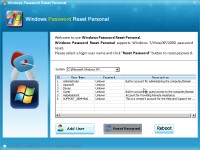
Asunsoft Windows Password Reset is an all-in-one Windows Password Recovery tool which can reset Windows 7, vista, XP, 2008, 2003, 2000 administrator and user's password for any desktop, mini notebook or laptop including Dell, HP, Toshiba, Sony, Acer, ThinkPak, lenovo etc. Recover all Windows password without files lost. All you need is a writable CD/DVD or USB Flash Drive. Three simple steps to use Windows Password Reset Personal for Dell Password Recovery.
Step 1: Download Windows Password Reset Personal and install it on another computer.
Step 2: Create a Dell password recovery disk. You just need to run the software and burn it to a blank CD/DVD or USB flash drive.
Step 3: Insert the disk to your dell laptop or desktop, set it to boot from the Dell password recovery disk by changing Device Boot Order.
Step 4: After booting from the disk, Windows Password Reset will run automatically and display a friendly interface. Then you can reset whichever account password of Windows operating system on your Dell laptop/desktop. Just need a few clicks(click your user name and click "Reset Password").
Скачать Dell Password Reset бесплатно на странице загрузки.
Dell Password Reset 4.0
Основная информация о программе
Разработчик
Лицензия
Версия
Дата релиза
Размер файла
Операционная система
Семейство
Версия ОС
Win7 x32
Win7 x64
Win98
WinServer
WinVista
WinVista x64
WinXP
Требования
Популярность у пользователей
Рейтинг
Голосов
Статистика просмотров
За сегодня
За неделю
За все время
Статистика загрузок
За сегодня
За неделю
За все время
Дополнительная информация
Дата изменения
Ключевые слова
Скачать Dell Password Reset 4.0
dell password reset
reset dell password
dell laptop password recovery
dell password recovery
dell windows password reset
Популярные программы рубрики


