
Скачать iCoolsoft QuickTime Converter
convert video to quicktime MOV, MP4, M4V
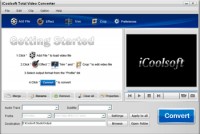
iCoolsoft QuickTime Converter is a professional and practical software. It can convert any video format, such as, MPG, MPEG, MPEG 2, VOB, DAT, MP4, M4V, TS, RM, RMVB, WMV, ASF, MKV, AVI, 3GP, 3G2, FLV, SWF, etc. to MOV, MP4, or M4V format, spending as little time as possible.
In addition, it also functions as a powerful video editor. It provides you with the edit functions like adjusting effect, trimming clips, cropping video display size, merging clips, and adding watermark. With those functions, you can customize your own video or audio files at will easily.
It also allows you to set the output parameters as you like, including Resolution, Frame Rate, Video Bitrate, Audio Bitrate, Sample Rate and Channels. You can also select audio track and subtitle if the original video provides more than one.
The interface of this software is very user-friendly and the steps needed are quite few. So it is very easy for everyone to use this software.
Functions and Features
Powerful QuickTime video converter
This QuickTime Converter can help you to convert almost all kinds of videos to MOV, MP4, or M4V format with high quality and fast speed. The supported input video formats are like, MPG, MPEG, MPEG2, VOB, MP4, M4V, RM, RMVB, WMV, ASF, MKV, TS, and so forth.
Convert video files to audio files
Besides converting general audio files to AAC, AIFF, MP3, M4A, or WAV format, you can also use this software to extract audio tracks from videos and then convert them to AAC, AIFF, MP3, M4A, or WAV format.
Edit to customize files
If you do not like some part of the original video or audio, you can use the trim function to trim it out. Or you can use the trim function to convert only a part of the video/audio. You can also merge several clips together to make them as a whole file.
Crop display area
You can crop display area to get rid of black borders around movies or zoom in some part of video image. You can also select aspect ratio as you like easily.
Скачать iCoolsoft QuickTime Converter бесплатно на странице загрузки.
iCoolsoft QuickTime Converter 3.1.12
Основная информация о программе
Разработчик
Лицензия
Версия
Дата релиза
Размер файла
Операционная система
Семейство
Версия ОС
Требования
Популярность у пользователей
Рейтинг
Голосов
Статистика просмотров
За сегодня
За неделю
За все время
Статистика загрузок
За сегодня
За неделю
За все время
Дополнительная информация
Дата изменения
Ключевые слова
Скачать iCoolsoft QuickTime Converter 3.1.12
quicktime video converter
convert windows media to quicktime
quicktime video to mp4 converter
apple quicktime converter
mpeg to quicktime converter
quicktime mov files converter
converter flv to quicktime
mpeg4 to quicktime movie converter
Популярные программы рубрики


